Product Updates
Stay up to date with the latest features and improvements to Climate Calling.
June 2025
New FeatureAdded Password Reset Functionality - Users can now reset passwords on their own without having to contact support - By @nikhilrado
New FeatureCreated Support Site - Users can now access self serve support pages, product updates, and our public roadmap at support.climatecalling.org - By @nikhilrado
July 2025
PerformanceHomepage Speed and Reliability Improvements - Home page should now load up to 600ms faster. Initial server response time for some pages decreased by 4x. Better error handling for authentication issues. - By @nikhilrado
Feature ImprovementSearchable Filters on Opportunities Page -
Filters on the /app/opportunities page are now searchable, making it easier to find relevant options. A bugfix improved the rendering of opportunity descriptions.
- By @nikhilrado
Feature ImprovementImproved Pagination Navigation -
The pagination controls at the bottom of the /app/opportunities page have been redesigned for a cleaner and more intuitive experience.
- By @nikhilrado
Feature ImprovementPublic Access to Opportunities - Users can now view all opportunities without needing to log in. - By @nikhilrado
Bug FixOpportunity Page Search Functionality - The search feature on the public opportunities page now works as expected. - By @nikhilrado
Bug FixShared Opportunity Link Previews - Previews for shared opportunity links now display correctly. Image previews will be available soon. - By @nikhilrado
UpdateSpelling, Localization, and UI Enhancements - Improved spelling, localization, and user interface for opportunity card renderings. - By @nikhilrado
October 2025
PerformanceFaster Page Loading with Optimized Animations - Homepage now loads significantly faster with improved animation loading strategies. Animations are now loaded only when needed, reducing initial page load time and improving the overall browsing experience. - By @nikhilrado
Feature ImprovementOpportunity Type Badges on Cards - All opportunity cards now display clear badges indicating the type of opportunity (e.g., internship, volunteer, event), making it easier to quickly identify opportunities that match your interests. - By @nikhilrado
Bug-FixImproved Date Display - Opportunity dates are now shown in a clearer, more consistent format across the site, making it easier to see when opportunities are happening. - By @nikhilrado
Bug-FixBetter Login Experience - After signing in, you'll now be directed straight to the opportunities page so you can start exploring right away. - By @nikhilrado
PerformanceAbout & Key Pages Performance Enhancement - The about page, opportunities page, contact page, and resources page now load faster thanks to improved caching strategies that reduce load times and make browsing smoother. - By @nikhilrado
PerformanceFaster Flag Icons & Improved Globe Graphics - Flag icons now load more quickly and the globe visuals have been refreshed for better clarity and smoother rendering across devices — making maps and shared links appear faster and crisper. - By @nikhilrado
User-ExperienceNavigation and Styling Refinements - The density of information on the public opportunities page has been increased to make opportunity searching easier. This now shows the six most recent opportunities uploaded within the specified country. A "suggested opportunities" panel has been added to the left side of each opportunity to encourage more exploration. - By @nikhilrado
December 2025
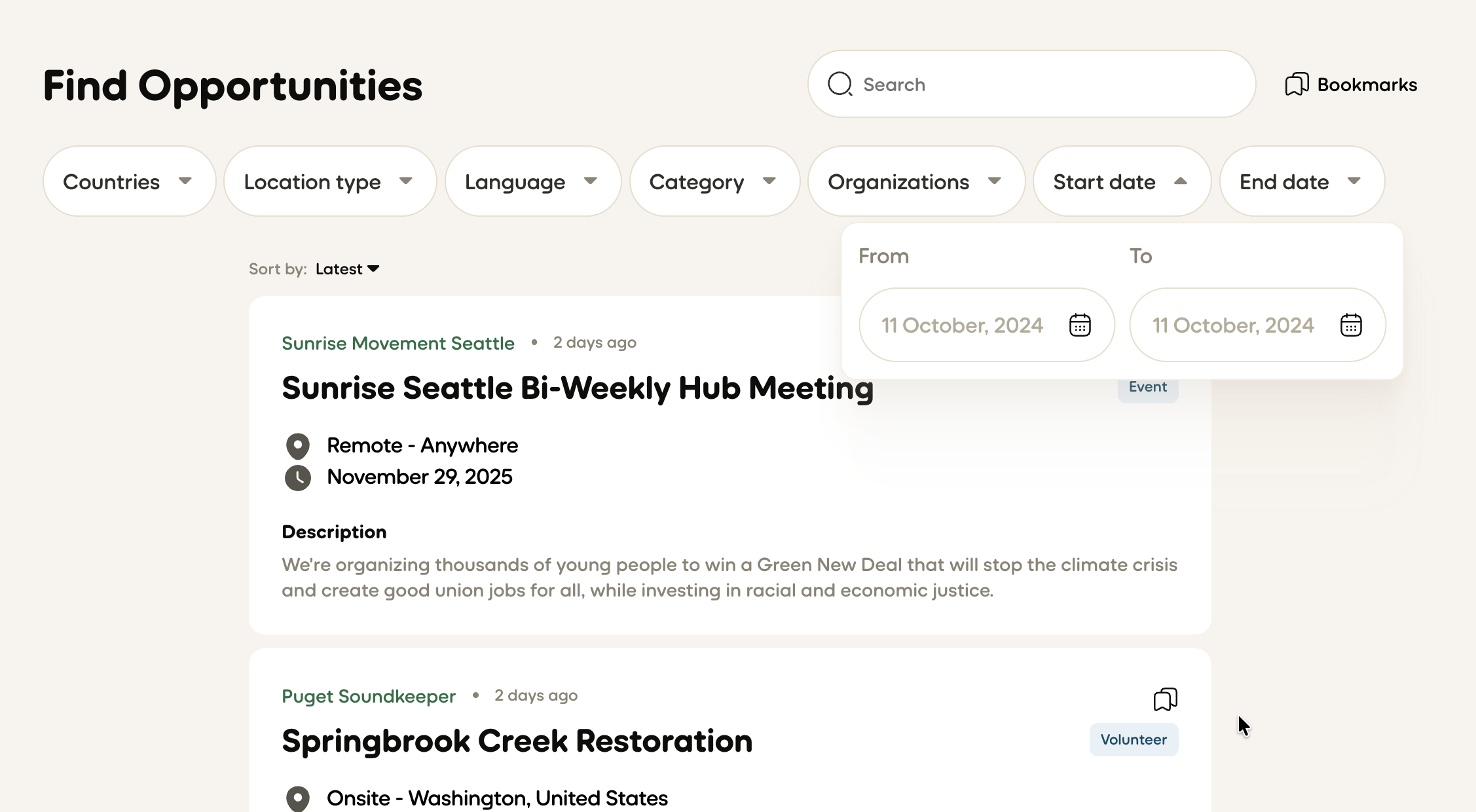 New FeatureSmarter Date Filtering -
Finding opportunities is now faster with a simplified "Dates" filter. Instead of picking start and end dates separately, you can now use smart presets like "This week," "Next 30 days," and "This summer" to quickly find opportunities in relevant timeframes.
- By @nikhilrado
New FeatureSmarter Date Filtering -
Finding opportunities is now faster with a simplified "Dates" filter. Instead of picking start and end dates separately, you can now use smart presets like "This week," "Next 30 days," and "This summer" to quickly find opportunities in relevant timeframes.
- By @nikhilrado
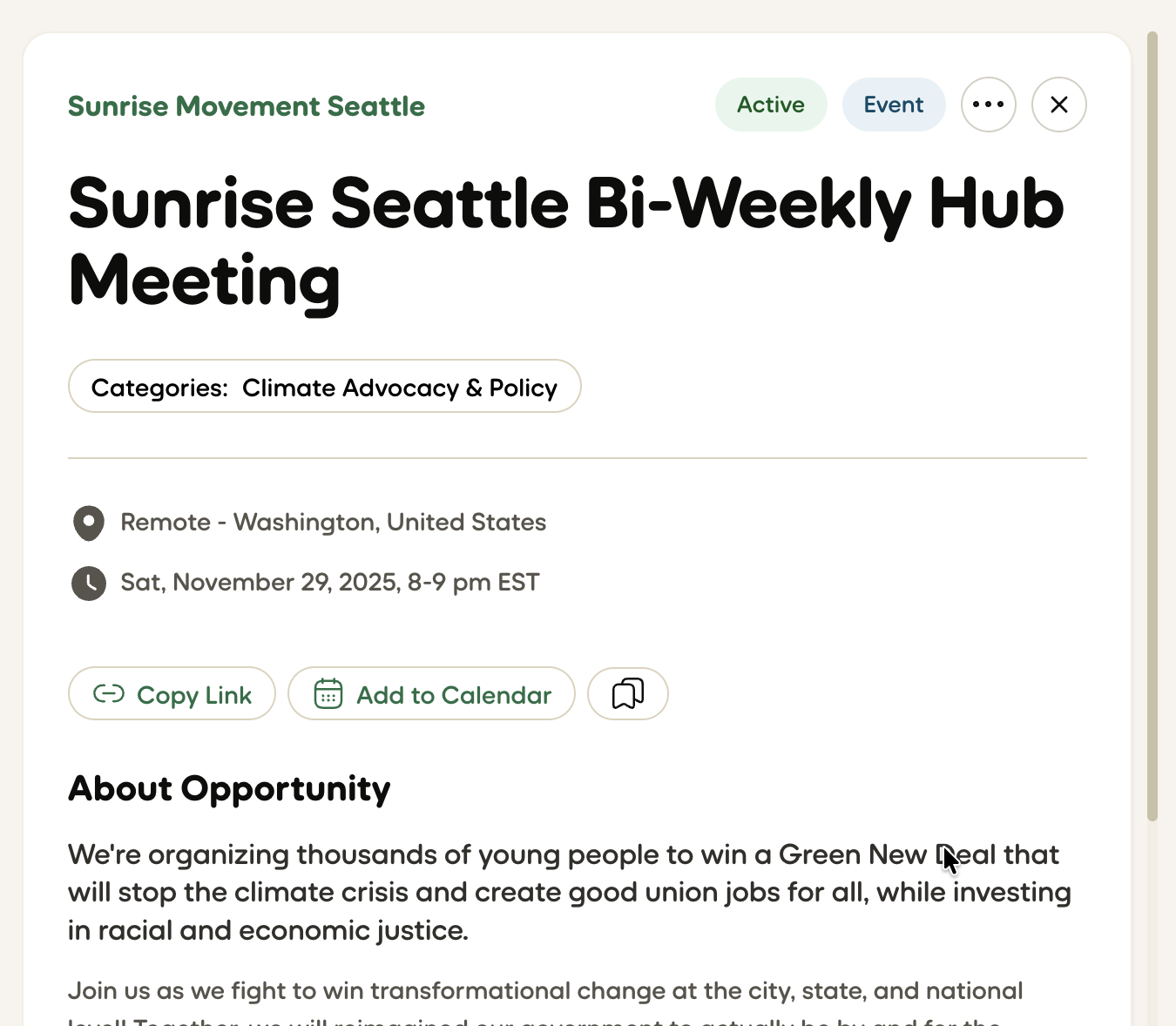 New FeatureAdd-to-Calendar for Event Opportunities -
Event-type opportunities now include an "Add to calendar" action. Users can add events to Google Calendar, Outlook (web & desktop), and Apple Calendar via a downloadable .ics file. Event times are converted to the viewer's local timezone, include duration, location (with map link).
New FeatureAdd-to-Calendar for Event Opportunities -
Event-type opportunities now include an "Add to calendar" action. Users can add events to Google Calendar, Outlook (web & desktop), and Apple Calendar via a downloadable .ics file. Event times are converted to the viewer's local timezone, include duration, location (with map link).
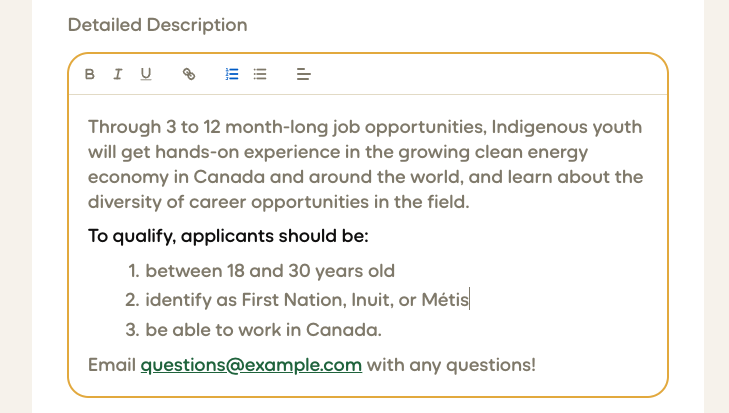 New FeatureRich Text Editing for Opportunity Descriptions -
Opportunity descriptions now support inline formatting: bold, italics, underline, bullet and numbered lists, and clickable links. The editor includes keyboard shortcuts (Ctrl/Cmd+B, I, U), paste-friendly handling from docs, and a preview mode so you can see how descriptions will appear on cards and detail pages.
- By @nikhilrado
New FeatureRich Text Editing for Opportunity Descriptions -
Opportunity descriptions now support inline formatting: bold, italics, underline, bullet and numbered lists, and clickable links. The editor includes keyboard shortcuts (Ctrl/Cmd+B, I, U), paste-friendly handling from docs, and a preview mode so you can see how descriptions will appear on cards and detail pages.
- By @nikhilrado
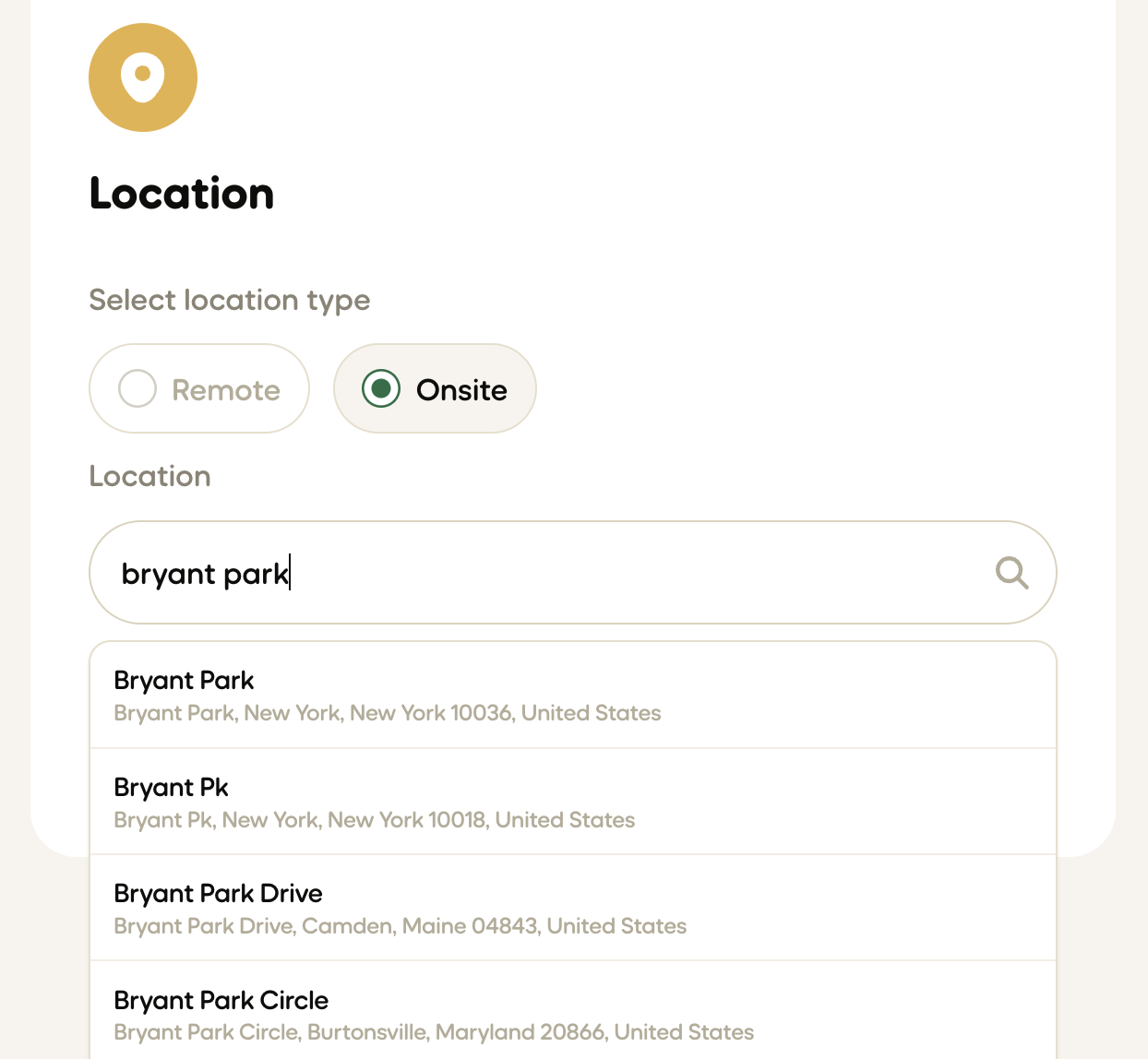 New FeatureLocation Autocomplete in Opportunity Creation -
When creating or editing an opportunity, the location field now includes autocomplete suggestions. Start typing a city, state, country, address, or place and relevant options will appear for easy selection. This helps ensure accurate and consistent location data across the platform, while reducing the time it takes to post opportunities.
- By @nikhilrado
New FeatureLocation Autocomplete in Opportunity Creation -
When creating or editing an opportunity, the location field now includes autocomplete suggestions. Start typing a city, state, country, address, or place and relevant options will appear for easy selection. This helps ensure accurate and consistent location data across the platform, while reducing the time it takes to post opportunities.
- By @nikhilrado
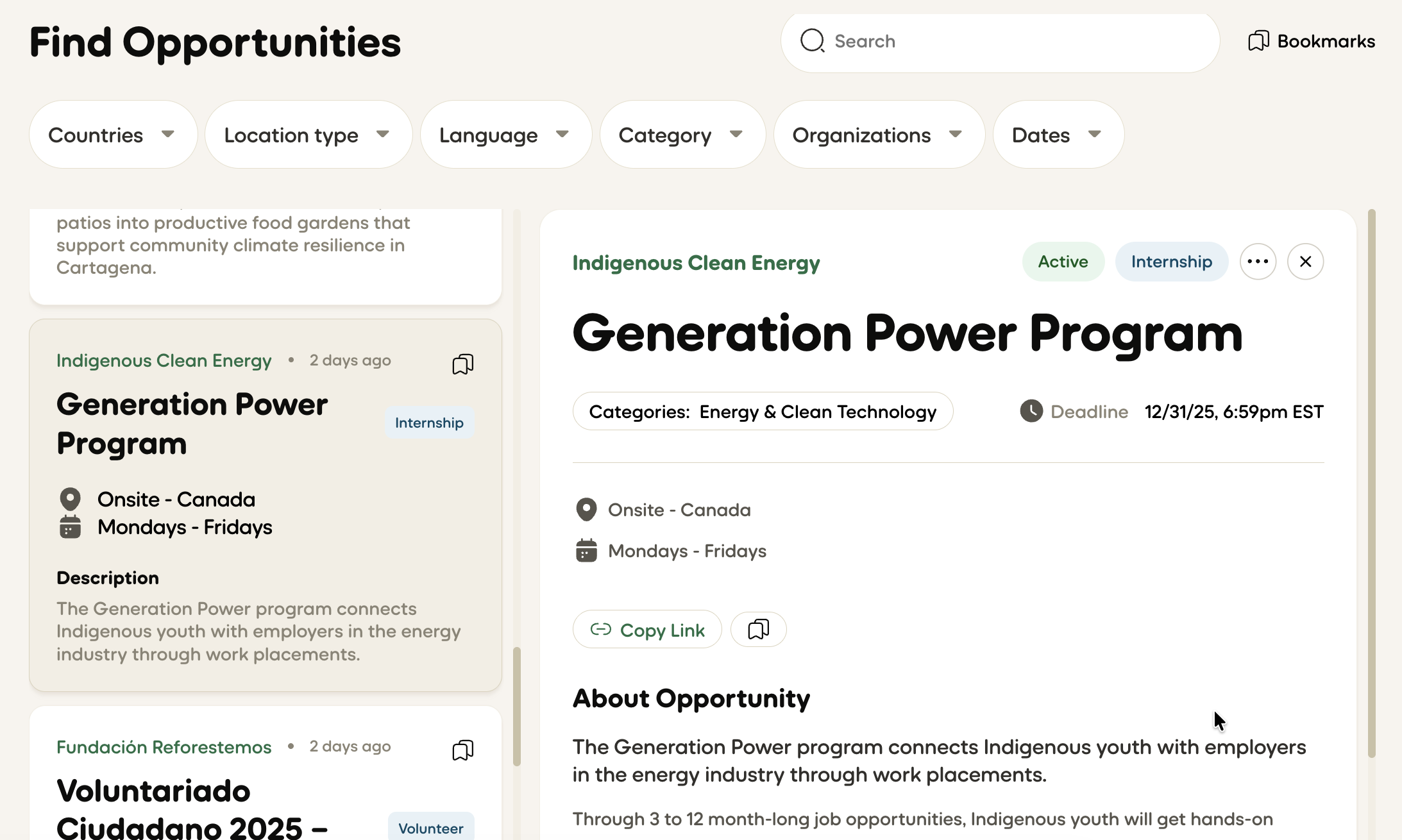 User ExperienceBetter Side-by-Side Browsing -
On desktop, you can now scroll through the opportunity list and details panel independently. The currently selected opportunity is highlighted, making it clear which one you're viewing. No more losing your place when clicking between opportunities.
- By @nikhilrado
User ExperienceBetter Side-by-Side Browsing -
On desktop, you can now scroll through the opportunity list and details panel independently. The currently selected opportunity is highlighted, making it clear which one you're viewing. No more losing your place when clicking between opportunities.
- By @nikhilrado
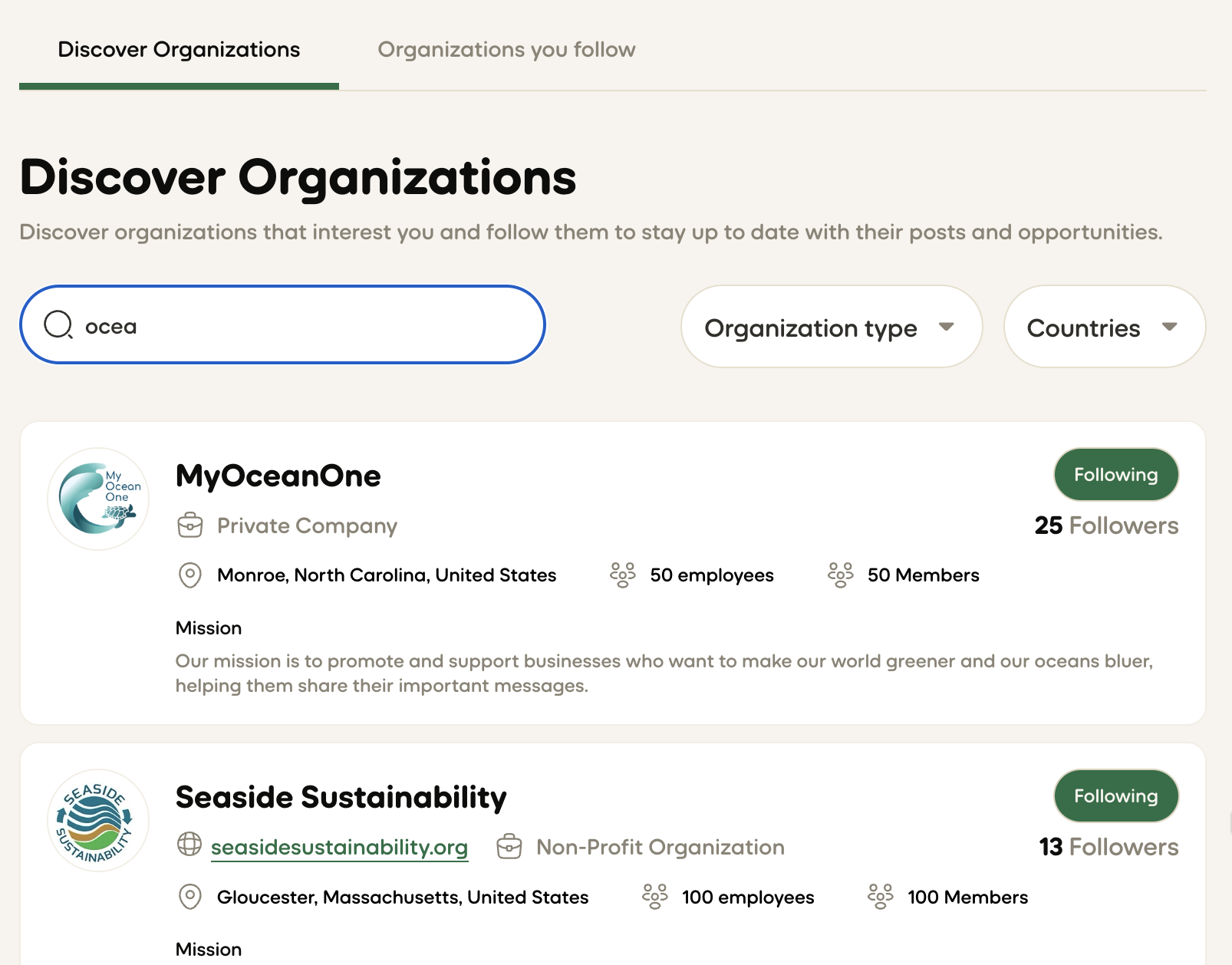 User ExperienceImproved Organization Search UX - Higher information density and more helpful actions make exploring organizations more pleasant.
User ExperienceImproved Event Times & Timezone Display - Events now show dates, times, and deadlines in your local timezone with clear formatting (e.g., "Fri, November 29, 2025, 3-5 pm EST"). No more mental timezone conversions needed. - By @nikhilrado
User ExperienceSmarter Navigation for Organizations - Organizations now see clearer navigation with "Find Opportunities" and "My Opportunities" as distinct menu items. The close button on opportunity details now intelligently returns you to where you came from — if you were on "My Opportunities," you'll go back there instead of the general feed. - By @nikhilrado
User ExperienceCount Badges Everywhere - Bookmark tabs, organization profile tabs, and other sections now show count badges so you always know how much content is available before clicking. - By @nikhilrado
User ExperienceClearer Publishing Flow - When creating opportunities, the draft review now shows exactly how your opportunity will appear to youth leaders. The final button now says "Publish" instead of "Complete," and you'll be redirected to "My Opportunities" after posting. - By @nikhilrado
User ExperienceBetter Date & Time Picker - The date and time picker now shows times in a friendlier 12-hour format (e.g., "7:00pm" instead of "19:00"). The placeholder displays today's date, and when editing opportunities, your original dates now load properly. You can now use natural language to express times making it easier to create opportunities. - By @nikhilrado
User ExperienceSmarter Location Display - Location information now displays more cleanly — showing city, state, and country without redundant details. Remote opportunities clearly show their geographic scope. - By @nikhilrado
Bug FixMore Reliable Login & Signup - Login and signup now work more reliably. After signing in or creating an account, you'll always be taken to the right page with your account fully loaded — no more occasional blank screens or needing to refresh. - By @nikhilrado
Bug FixFixed Date Pickers in Profiles - Date pickers for date of birth and application deadlines no longer cause errors when clearing dates, making profile editing more reliable. - By @nikhilrado
Bug FixMore Relevant "Expiring Soon" Recommendations - The "Expiring Soon" section now correctly shows only opportunities with deadlines within the next 30 days, making recommendations more useful. - By @nikhilrado
Bug FixFixed Organization Follower Counts - Previously organization pages displayed follower counts as zero due to a overly restrictive security policy. - By @nikhilrado
Bug Fix App Update Notifications - When we release updates, you'll now see a clear notification letting you know a new version is available. New versions are automatically loaded. Previously a subset of users would see an error shortly after a new update when their browser served cached versions. - By @nikhilrado
PerformanceFaster Page Loads - Removed unused code and optimized how opportunity data is stored and retrieved, resulting in faster page loads and smoother interactions throughout the platform. - By @nikhilrado
PerformanceImproved Database Structure - Information for new opportunities is stored in a much more organized and feature rich way. This allows faster opportunity creation, and the development of better search and matching algorithms in the future. - By @nikhilrado
PerformanceBetter Error Tracking & Analytics We've switched to a new service to better monitor errors allowing us to resolve them much faster than before. Enhanced analytics services enable us to provide better search and matching algorithms, and help us better understand how our youth and organizations are using Climate Calling. This also includes in app surveys and feedback widgets!
Check back regularly for the latest product announcements and feature releases.